
In Part 1 of this series, we diagnosed exactly why West.Taxi was stuck on page four and built the blueprint to fix it. This post is where the real building starts the part most business owners never see, because it happens under the hood.
Here is the reality of the transfer market in Europe: a traveller has just landed, they’re tired, they’re on airport Wi-Fi or a weak mobile signal, and they have about five seconds of patience. If your page is slow, confusing, or in the wrong language, they bounce and book a competitor. So before we chased any more rankings, we rebuilt the technical “materials” of the site: the structured data/schema types, the page speed, the mobile UX, and the multilingual setup. I’m Tanvir Hasan Shawn, a White Hat SEO Expert— let’s open the hood.
What is the best schema markup for a local transport company?
Quick answer: The best schema for a local transport company is a combination, not a single type: LocalBusiness / TaxiService for the business itself, Service for each route or offering, FAQPage for common questions, BreadcrumbList for structure, and AggregateRating / Review for social proof all in JSON-LD.
Schema markup is code that tells Google and AI systems exactly what your business is, where it operates, and what it offers. Get it right and you become eligible for rich results (star ratings, FAQs, business panels) and far easier for AI Overviews to quote. For West.Taxi, the Local Business schema markup stack we built included:
- TaxiService / LocalBusiness: name, address, geo-coordinates, telephone, opening hours, priceRange, areaServed (Innsbruck & the Tyrol resorts), and sameAs links to social and Business Profile.
- Service: one entry per core route (airport-to-resort), so each transfer is a machine-readable offering.
- FAQPage: marks up the on-page questions so they can win featured snippets and AI answers.
- BreadcrumbList: clarifies site structure and improves how the URL shows in results.
- AggregateRating / Review: surfaces the star rating that dramatically lifts click-through.
Here is a simplified version of the core markup — the real implementation is more detailed, but this shows the shape of it:
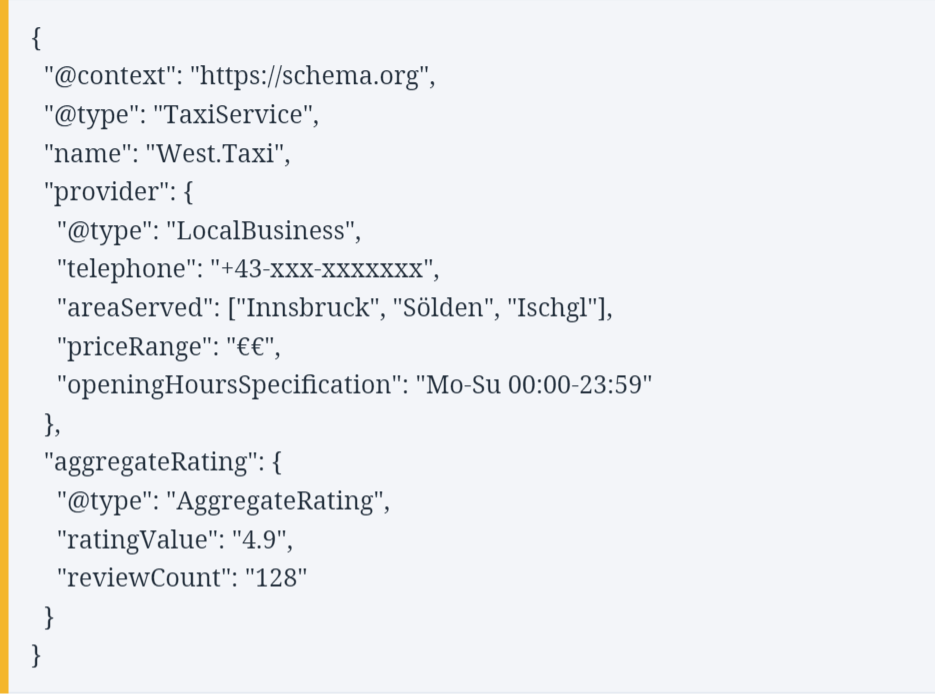
Simplified example. The live markup also includes Service, FAQPage and BreadcrumbList, and is validated in Google’s Rich Results Test before going live.

How does website speed affect taxi booking conversion rates?
Quick answer. Website speed has a direct, measurable effect on booking conversions. Google’s own research shows that as mobile page-load time rises from one to three seconds, the probability of a bounce jumps sharply and for last-minute, high-intent transfer bookers, every lost second is a lost fare.
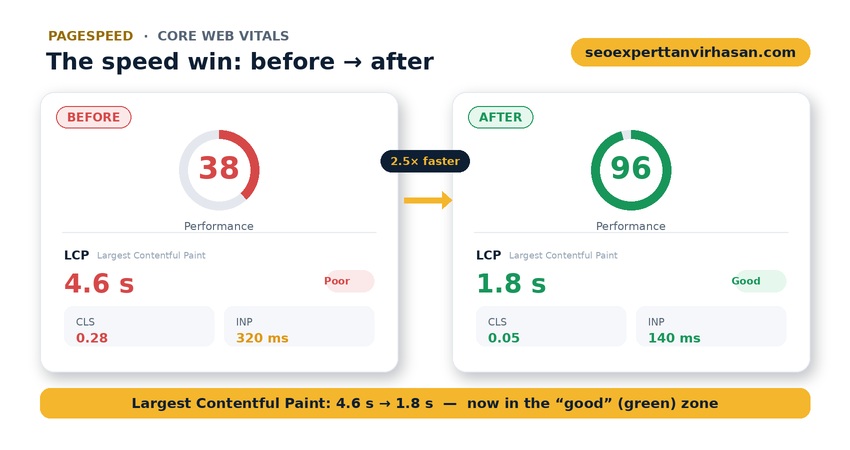
Speed is not a vanity metric; it is a UX conversion rate lever and a ranking factor at the same time. Google measures the real experience through Core Web Vitals Largest Contentful Paint (how fast the main content appears), Cumulative Layout Shift (how stable the page is), and Interaction to Next Paint (how quickly it responds to taps). Slow or janky pages lose bookings twice: visitors leave, and Google ranks the page lower so fewer arrive in the first place.
For a transfer business the stakes are higher than average, because your customers are overwhelmingly mobile and often in a hurry. A fast, stable page with a tap-to-call button visible immediately can be the difference between a booking and a bounce.
PageSpeed optimisation: the tools and the fixes
To rebuild speed, we measured with real tools and fixed the biggest offenders first. The PageSpeed optimization toolkit:
- Measurement: Google PageSpeed Insights and Lighthouse for lab and field data, plus WebPageTest for a frame-by-frame view of what loads when.
- Images: compressed and served in next-gen formats (WebP), correctly sized, and lazy-loaded below the fold usually the single biggest speed win.
- Code: minified CSS and JavaScript, deferred non-critical scripts, and trimmed third-party tags that were quietly slowing everything down.
- Delivery: browser caching, a content delivery network (CDN) to serve European visitors from nearby, and a faster server response time.
- Fonts & layout: optimised web fonts and reserved space for images to eliminate layout shift (CLS).
The targets were concrete: LCP under 2.5 seconds, CLS under 0.1, and INP under 200 milliseconds the thresholds Google treats as “good.” Hitting them made the site feel instant on a phone, which is exactly where the bookings happen.
Speed work is never one-and-done. Google indexes the mobile version of your site first, so we tested on real mid-range phones and throttled connections rather than a fast office laptop, and set up ongoing monitoring in Search Console so a future plugin or an oversized image gets caught before it quietly drags rankings back down.
UI/UX layouts that turn visits into bookings
Speed gets people to stay; UX gets them to book. Traffic without conversions is just an expensive vanity metric, so we redesigned the on-page experience around a single question: how fast can a traveller go from “landed” to “booked”?
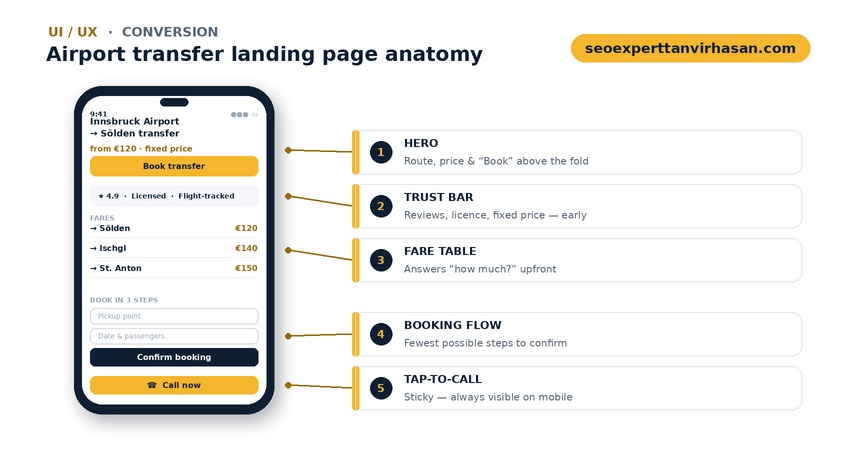
The anatomy of the airport transfer landing page we built for each route:
- A hero that answers instantly: route, fixed price, and a booking button above the fold, with no scrolling required.
- A sticky tap-to-call button: always visible on mobile, because many transfer bookings still happen by phone.
- Trust signals early: star rating, licensing, fixed-price guarantee and flight-tracking, right where doubt would otherwise creep in.
- A transparent fare table: answering the customer’s real question (“how much?”) instead of hiding it behind a form.
- A short, mobile-first booking flow: the fewest possible steps from intent to confirmation.
Each of these choices lifts the UX conversion rate and because the pages are fast and schema-rich, they rank better while converting more of the traffic they earn.
We also removed friction most owners never notice: unnecessary form fields, hidden pricing, and slow confirmation steps. Then we tracked the real journey in analytics where visitors dropped off, which routes converted best so every later change was driven by evidence, not guesswork.
Translation & multilingual optimisation (EN / DE)
Innsbruck’s travellers search in English and German, so a single-language site was leaving bookings on the table. But multilingual SEO done badly auto-translation, or one page trying to serve two languages confuses both users and Google.
We built proper, separately optimised language versions, each targeting how that audience actually searches (for example, “airport transfer” in English and “Flughafentransfer” in German), and connected them with correct hreflang tags so Google serves the right version to the right searcher. Prices, formats and phrasing were localised, not just word-swapped. For any European transport business serving international travellers, this multilingual layer is one of the highest-return technical investments there is.

The impact of the overhaul
By the end of this phase, West.Taxi’s site was fast, stable, machine-readable and bilingual — the technical “materials” were finally worthy of the service. Core Web Vitals moved into the green, the pages became eligible for rich results, and every visit had a clear, quick path to a booking. Rankings and conversions both improved, because for once they were pulling in the same direction.
In Part 3, we take everything above and point it at the map: the Google Business Profile and local-signal work that carried West.Taxi into the Maps 3-pack. But the lesson from this phase is simple:
A beautiful website that loads slowly is a slow website. For travellers booking on a phone, speed and clarity aren’t features — they’re the whole product.
If your transport website feels slow or isn’t turning visits into bookings, that’s fixable — usually faster than you’d expect. You can book a free visibility audit with me at seoexperttanvirhasan.com.
Technical SEO for transport: your questions answered
What is the best schema markup for a local transport company?
A combination in JSON-LD: LocalBusiness or TaxiService for the business, Service for each route, FAQPage for common questions, BreadcrumbList for structure, and AggregateRating/Review for star ratings. Always validate it in Google’s Rich Results Test before publishing.
How does website speed affect taxi booking conversion rates?
Directly. Google’s research shows bounce probability rises sharply as mobile load time grows from one to three seconds, and transfer customers are mostly mobile and in a hurry. Faster, more stable pages (good Core Web Vitals) keep more visitors and convert more of them into bookings.
What are good Core Web Vitals scores for a booking website?
Aim for Largest Contentful Paint under 2.5 seconds, Cumulative Layout Shift under 0.1, and Interaction to Next Paint under 200 milliseconds. These are the thresholds Google labels “good,” measured on real mobile visits.
Do I need separate landing pages for each airport transfer route?
Yes. A dedicated page per route (for example, airport-to-Sölden) matches the exact search intent, lets you show a fixed price, and ranks far better than one generic page trying to cover every route at once.
How should I handle English and German on my taxi website?
Create separate, properly optimised pages for each language — targeting how each audience searches — and connect them with correct hreflang tags. Avoid auto-translation and never mix two languages on one page; localise prices and phrasing, not just the words.

